
Reporting a review
How to remove a Google review: report, timing and appeal
Where to click “Report review”, how long to wait, what the report statuses mean and how to appeal. Google removes only reviews that break its policies.
Updated
To report a fake review, open it in Google Maps, click the three dots and choose “Report review”. The profile owner can do the same from the Business Profile or the reviews management tool. Google removes only reviews that break its policies. It typically takes several days to assess a report, and if the review stays, you can appeal once.
Which reviews Google removes
Google removes a review only if it breaks the Maps content policies. You can report any review, but Google asks you not to report one just because you disagree with it. Grounds for reporting under Google’s policies:
- Fake engagement: an experience that never happened, a competitor review meant to hurt your reputation, rating manipulation.
- Conflict of interest: a review from the owner, an employee or a competitor.
- Impersonation.
- Harassment, hate speech, offensive content.
- Personal information: a phone number, address or other personal details in the text.
- Obscenity and profanity.
- Off-topic text, advertising, unclear or repetitive content.
Harsh but honest criticism does not break the rules. Reply to it instead: how replying to reviews works for a business.
How to report a review as the profile owner
An owner can report from the Business Profile or through the reviews management tool. Both require you to sign in to the Google Account that manages the profile.
- Go to your Business Profile and select “Read reviews”.
- Next to the review, select the flag icon to report it.
- Select the reason, for example “Spam” or “Profanity”.
- Select “Send report”.
The reviews management tool follows similar steps and then shows the status of each report:
- Check the account (“Confirm” or “Switch account”) and select the business.
- Select “Continue”, then “Report a new review for removal”.
- Next to the review, select “Report”, choose the violation in the new tab and select “Submit”.
How to report a review in Google Maps
Any user can report a review, not only the owner. You only need to be signed in to a Google Account: if you are signed out, Maps opens a sign-in page instead of the report form.
- Find the business in Google Maps and open the “Reviews” tab.

- Next to the review, click the three dots and choose “Report review”.
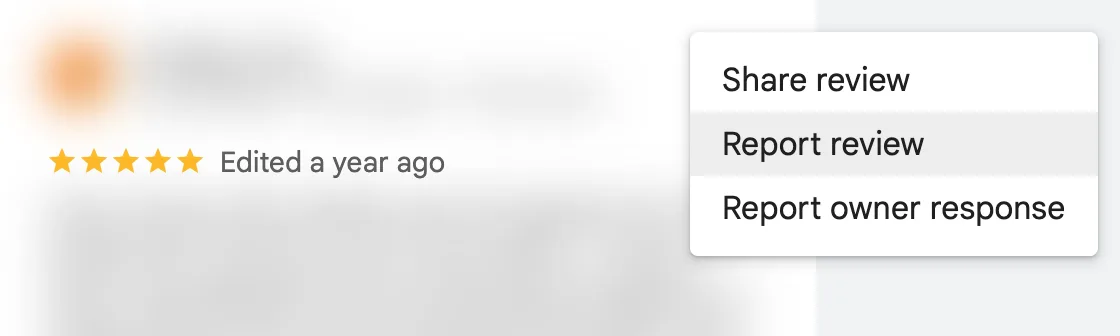
Google Maps on a computer, 5 November 2026. We blurred the reviewer’s name and the review text.
- In the form, choose the policy the review breaks and click “Submit”.
In the Google Maps app, open the “Reviews” tab, find the review, tap the three dots, then choose “Report review” and “Submit”.
How long it takes and what the statuses mean
Google says “review evaluation typically takes several days” and gives no fixed deadline. The owner sees the status of each report in the reviews management tool:
- “Decision pending”: the report is still being reviewed.
- “Report reviewed - no policy violation”: the review stays, but you can appeal.
- “Escalated - check your email for updates”: Google will email the decision.
Reports sent from the Google Maps app appear in its Reports section as “Processing report”, “Content removed”, “Content not removed”, “Content restored” or “Report Canceled”. A removed review no longer shows on Maps or Search.
How to appeal if the review stays
If Google found no violation, you can submit one appeal in the reviews management tool.
- Select “Continue” and choose “Check the status of a review I reported previously and appeal options”.
- Select “Appeal eligible reviews”. You can select up to 10 reviews at a time.
- Select “Submit an appeal”, complete the form and select “Submit”.
Keep to the point: say which policy the review breaks and which facts show it. For example, the business was closed that day, or your booking records show no visit matching the details described.
What to reply to a fake review while you wait
While the report is pending, everyone can see the review, so reply calmly and briefly: facts without accusations and an offer to talk.
Thank you for writing. We checked our bookings for this week and found no visit matching these details. Please call us on the number in our profile so we can look into it.
A demonstration example, not a reply from a real business.
- Do not call the reviewer a liar, and do not say in the reply that you have reported the review.
- Do not reveal customer details, even if you recognise the person.
- Google checks replies before publishing them: usually within 10 minutes, sometimes up to 30 days.
To spot a suspicious review on the day it appears, MapsReply notifies you about new reviews and prepares a draft reply, while 1–3 star reviews wait for your decision. How fast to reply to reviews.
If someone demands money to remove reviews
If someone offers to remove negative reviews for payment or threatens a wave of bad reviews, do not engage and do not pay. Google advises against dealing with it yourself and provides a separate report for extortion.
- Save screenshots of the messages with the date, time and the sender’s contact details.
- Complete the extortion report form and attach the screenshots.
What Google does not do
- It does not remove a review just because you disagree with the rating or text.
- It does not promise a deadline: “several days” is typical, not guaranteed.
- It does not allow rewards for removing or changing a review: payments, discounts or gifts for it break the policies.
- It does not give a second appeal on the same decision.
Only Google decides, so nobody, MapsReply included, can guarantee that a review will be removed.
More about MapsReply · Replying to reviews
Frequently asked questions
Can I get a review removed if it is unfair?
Only if it breaks Google’s policies. Google does not remove unfair but honest criticism: reply to it and show how you solved the problem.
Can I report a review left by a competitor?
Yes. Google’s policies prohibit reviews that competitors write to hurt your reputation and reviews based on a conflict of interest. In the report, choose the reason about fake content or conflict of interest.
How long does Google take to review a report?
Typically several days. If the report is escalated, Google emails the decision.
Can I offer a customer a discount to delete a review?
No. Google’s policies prohibit incentives for posting a review, changing it or removing a negative review. If the problem is solved, the customer can update the review on their own.
What if the review stays even after the appeal?
Reply to it publicly and calmly. Future customers see both the review and your reply.
Sources
- Report inappropriate reviews on your Business Profile, Google Business Profile Help.
- Manage your Google Business reviews, Google.
- Report or Fix Content, Maps user contributed content policy.
- Prohibited & restricted content, Maps user contributed content policy.
- Report negative review extortion scams on your Business Profile, Google Business Profile Help.
- Manage customer reviews, Google Business Profile Help.
Steps and button names were checked against Google Help and the Google Maps interface on 5 November 2026. Google changes its interface from time to time: if a button is named differently, look for it in the same menu.