
Review rules
Why your Google review is not showing and what to do
How long the check takes, why Google does not publish or removes a review, how to find your review and what the author and the business owner can do.
A Google review does not always appear right away. First it is checked against the policies, and Google says this can take a few days. If more time has passed, the reason is usually one of these: the review breaks the policies, the spam filter removed it, the business profiles were merged, Google paused reviews for this place, or the review is simply hidden among the others. Below: how to find your review and what the author and the business owner can do.
How long until a review appears
Google says that checking a review against its policies “may take a few days”. When there is no violation, a review can appear within seconds: that is how Google described its moderation on its blog in 2022. Algorithms check the review first and pass suspicious ones to people. Google gives no more precise timing.
How to check where your review is
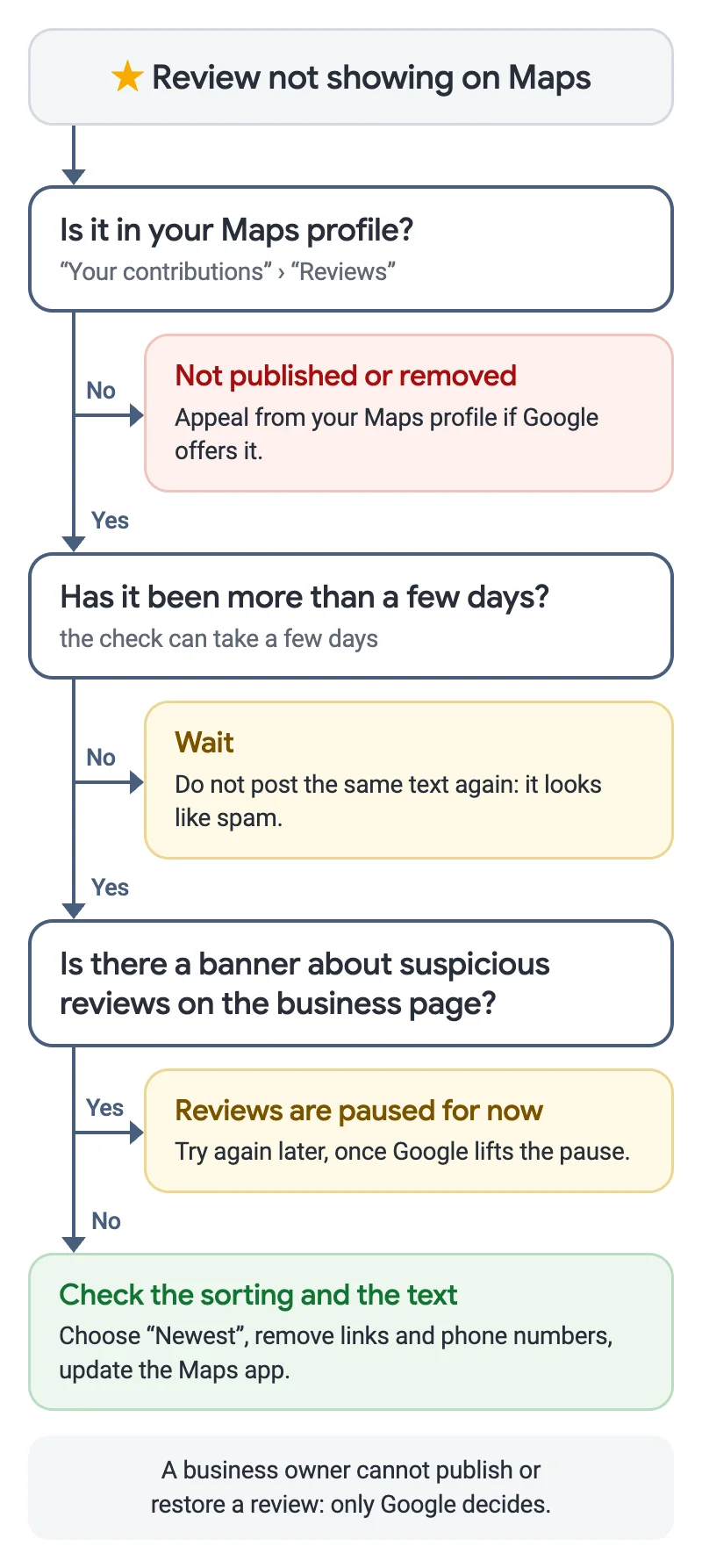
- Open your Maps profile: “Your contributions” in the menu on a computer, or your profile and its list of reviews in the app. If the review is not there or is marked as removed, it was not published.
- If the review is in your profile, open the business page, the “Reviews” tab, and change the sorting from “Most relevant” to “Newest”. By default a fresh review can sit far down the list.
- Make sure it is the same business page. If the business profiles were merged recently, the reviews of both appear on Maps within a few days.
- Update the Maps app. Google specifically suggests this when reviews do not show on an old phone or an outdated version.
Why Google does not publish a review
Google does not publish, or later removes, a review that breaks its user-contributed content policies. Reasons named in the policies:
- links, a phone number, an email address or advertising in the text;
- a review given for a reward: a discount, a gift, a bonus or money;
- a conflict of interest: reviewing your own business, your employer or a competitor;
- several reviews by one person from different accounts, or the same text posted several times;
- insults, threats, other people’s personal data or text that is not about an experience at this place.
Google also looks at the account history and the activity around the place, such as an unusual number of reviews in a short time. So an honest review is sometimes held back along with suspicious ones. Google does not explain which rule applied in your case.
Why a review disappeared after days or weeks
The check does not end once a review is published: Google keeps analysing reviews and removes those that turn out to break the policies. In 2025 Google blocked or removed more than 292 million policy-violating reviews. If not one review but several disappeared, the reason may lie with the profile:
- the profile was restricted for fake reviews, and existing reviews were unpublished for a period of time;
- the profile was reinstated after a suspension, and some reviews did not come back;
- Google temporarily turned off reviews for this place or a whole category to protect the business.
More on restrictions for fake reviews in the guide on what a business risks with bought reviews.
What the banner about suspicious reviews means
When Google notices a spike of suspicious reviews, it removes the fake ones, temporarily pauses new reviews on the profile and shows visitors a notice. The business owner is warned. While the pause lasts, nobody can post a review, not even a genuine customer. Google does not say how long it lasts: the policy says “for a period of time”.
What the author of the review can do
- If the review is still being checked, wait a few days and do not post it again: Google treats the same text posted several times as spam.
- If the review is in your profile, edit it: remove links, phone numbers and any mention of a discount for the review. After an edit, the review shows the date of the change.
- If the review was removed, open its status in your Maps profile and appeal if Google offers it. You can appeal once, and not every violation can be appealed.
- Write about your own experience: what you ordered, when you were there, what you liked or did not. Such a review is more useful to people and looks less like spam.
What the business owner can do
An owner cannot publish or restore a customer’s review: only Google decides. But an owner can lower the risk of honest reviews being held back:
- ask for reviews steadily, not from every customer on the same day: an unusual spike draws the system’s attention;
- do not promise a discount or a gift for a review, and do not ask only for five stars;
- do not ask staff or relatives to write reviews;
- give a direct link or a QR code to your own profile, so the customer does not review a duplicate page.
How to give customers an easy route to a review is covered in the guide on how to collect reviews with a QR code. And if a review that breaks the policies appears on your profile, you can report it to Google.
MapsReply helps you make a QR code that leads straight to your own profile’s review form, notifies you about new reviews and prepares a reply in your business’s tone. More about MapsReply.
What Google does not do
- it does not publish or restore a review at the business owner’s request;
- it does not explain which rule applied to a particular review;
- it does not give an exact time for the check or for a pause;
- it does not restore reviews removed for policy violations unless an appeal is approved.
Questions and answers
Why can only I see my review?
Most likely it is still being checked, or Google decided not to publish it. Google does not explain this state separately. Wait a few days, then check the review’s status in your Maps profile.
Does a new Google account matter?
Google says it looks at the account history, but it does not name an account age or a number of reviews after which an account is trusted. A new account by itself does not break any policy.
Does Google block reviews posted from the venue’s Wi-Fi?
Google does not say so. All that is known is that the system looks at the activity of the place and the account, so there is no official answer to this question.
Can I post the review again?
If the review was removed, first check its status and appeal. Do not post the same text again: that breaks the spam policy.
Can the business owner delete my review?
No. The owner can only report it, and Google removes a review only if it breaks the policies. The owner disagreeing with the rating is not a reason.
Sources
- About missing or delayed reviews, Google Business Profile Help.
- How reviews on Google Maps work, Google blog, 2 February 2022.
- Prohibited and restricted content, Google Maps policies.
- Business Profile restrictions for policy violations, Google Business Profile Help.
- Consumer alerts, Google Maps policies.
- Appeal Maps user-generated content policy enforcement actions, Google Maps Help.
- New ways we’re protecting businesses on Maps, Google blog, 16 April 2026.
The policies were checked against Google’s help on 5 November 2026, and button names against the Google Maps interface on the same day.